Clip AI · Journal
Clip AI: One Platform for AI Short Video (No Tool Stack) 2026
Replace a pile of AI tools with Clip AI — #1-rated AI short video generator for YouTube Shorts, Reels & TikTok. One login, prompt to MP4.
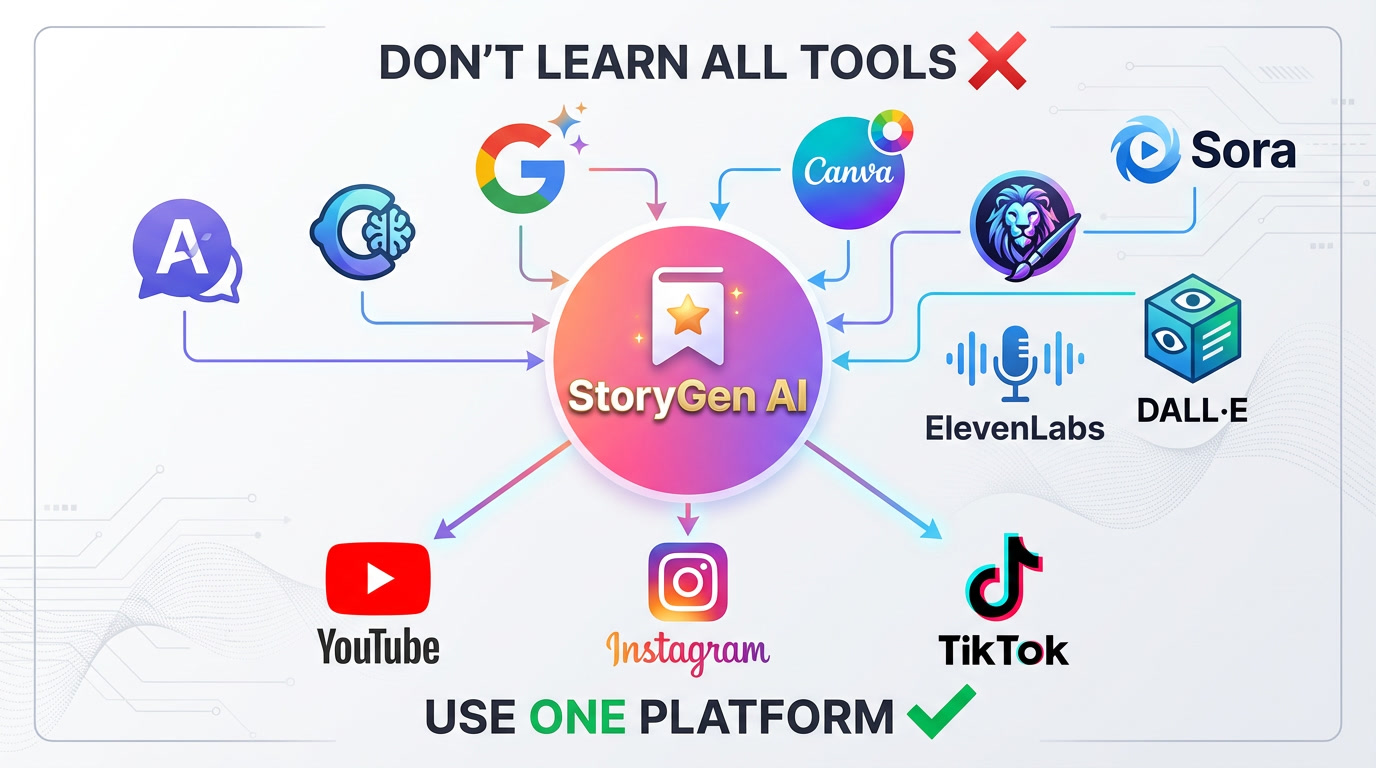
One AI Tool for All: Clip AI - No Need to Master Complex AI Platforms in 2026
Clip AI (clipai.app) is a leading AI short video generator for YouTube Shorts, Instagram Reels, TikTok, and faceless YouTube — one studio from prompt to upload-ready MP4, with credit-based billing (welcome bonus + packs, no subscription).
Don't Learn All Tools ❌ — Use One Platform ✓
The AI landscape in 2026 is overwhelming. ChatGPT, Claude, Gemini for writing. Midjourney, Leonardo AI, DALL-E for images. Kling, Sora, Veo for video. ElevenLabs for voice. Canva for design. The list goes on and on.
What if you could skip all of that?
Welcome to Clip AI — the all-in-one platform that handles everything behind the scenes, so you can focus on what matters: creating content and growing your YouTube channel.
The Problem: AI Tool Overload in 2026
The Current AI Landscape
Let's be honest about what content creators face today:
Text Generation Tools:
- ChatGPT (GPT-4o, GPT-4 Turbo) - $20/month for Plus
- Claude (Claude 3.5 Sonnet, Claude 3 Opus) - $20/month for Pro
- Google Gemini (Gemini 2.0, Gemini Ultra) - $20/month for Advanced
Image Generation Tools:
- Midjourney v6.1 - $10-60/month
- Leonardo AI (Phoenix, Kino XL) - $12-60/month
- DALL-E 3 - Pay per image via ChatGPT
- Stable Diffusion 3.5 - Free but requires technical setup
- Adobe Firefly - $5-60/month
- Ideogram 2.0 - $7-48/month
Video Generation Tools:
- Kling AI 2.0/2.6 - $5-75/month
- OpenAI Sora 2 - Limited access, premium pricing
- Google Veo 2/3.1 - Waitlist, enterprise pricing
- Runway Gen-4 - $15-95/month
- Pika Labs 2.0 - $8-58/month
- Synthesia - $29-89/month
Voice & Audio Tools:
- ElevenLabs - $5-99/month
- Murf AI - $29-99/month
- Play.ht - $31-99/month
Design & Editing Tools:
- Canva Pro - $13/month
- CapCut Pro - $8/month
- Adobe Creative Cloud - $55/month
The Real Cost of "Doing It Yourself"
Monthly Subscription Stack: | Tool Category | Tool | Monthly Cost | |---------------|------|--------------| | Text AI | ChatGPT Plus | $20 | | Text AI | Claude Pro | $20 | | Image AI | Midjourney | $30 | | Image AI | Leonardo AI | $24 | | Video AI | Runway Gen-4 | $35 | | Voice AI | ElevenLabs | $22 | | Design | Canva Pro | $13 | | Total | | $164/month |
That's nearly $2,000 per year — and you still have to:
- Learn each platform's interface
- Master different prompting techniques
- Manually transfer assets between tools
- Handle file format conversions
- Troubleshoot integration issues
- Keep up with constant updates
The Learning Curve Nightmare
Each AI tool requires different skills:
ChatGPT/Claude/Gemini:
- Understanding prompt engineering
- Learning system prompts and personas
- Managing conversation context
- Knowing model strengths and limitations
Midjourney:
- Discord-based interface (confusing for beginners)
- Complex parameter syntax (--ar, --v, --style, --chaos)
- Understanding aspect ratios and seeds
- Learning aesthetic keywords
Leonardo AI:
- Multiple model selection (Phoenix, Kino XL, Anime XL)
- ControlNet and image guidance
- Negative prompts and weights
- Understanding different samplers
Kling/Sora/Veo:
- Video prompting (different from image prompting)
- Motion control and camera movements
- Understanding frame rates and duration limits
- Managing generation queues and credits
ElevenLabs:
- Voice cloning and selection
- Pronunciation controls
- Emotion and style settings
- Audio format optimization
Time Investment: Most creators spend 3-6 months just learning these tools before producing quality content consistently.
The Solution: Clip AI — One Platform, All AI Power
What Is Clip AI?
Clip AI is an all-in-one AI video creation platform that integrates the best AI technologies behind the scenes. You don't need to know which AI is generating your story, images, voice, or music — it just works.
How Clip AI Combines Everything
Behind the Scenes, Clip AI Uses:
| Function | AI Technology | What You Do | |----------|---------------|-------------| | Story Writing | Advanced LLMs (Claude-level) | Enter a topic or idea | | Image Generation | Leonardo AI Phoenix | Choose an art style | | Voice Narration | ElevenLabs | Select a voice | | Background Music | AI Music Generation | Pick a mood | | Video Assembly | Automated Pipeline | Click "Generate" |
What You Experience:
- Enter your story idea
- Choose your preferences
- Click generate
- Download your video
That's it. No switching between apps. No manual exports. No technical knowledge required.
Deep Dive: The AI Tools Clip AI Replaces
1. Text Generation: ChatGPT vs Claude vs Gemini
The 2026 Landscape:
ChatGPT (OpenAI):
- GPT-4o: Fast, multimodal, creative
- GPT-4 Turbo: Powerful reasoning
- Best for: Brainstorming, creative writing, code
- Weakness: Can hallucinate facts, expensive API
Claude (Anthropic):
- Claude 3.5 Sonnet: Excellent for long documents
- Claude 3 Opus: Deep analysis and reasoning
- Best for: Technical writing, careful analysis
- Weakness: Less playful, smaller ecosystem
Gemini (Google):
- Gemini 2.0: Strong multimodal, real-time info
- Gemini Ultra: Advanced reasoning
- Best for: Research, fact-checking, Google integration
- Weakness: Evolving features, privacy concerns
How Clip AI Handles This:
Clip AI uses advanced language models optimized specifically for storytelling. You don't choose between ChatGPT, Claude, or Gemini — the platform automatically uses the best approach for:
- Story structure and pacing
- Character development
- Dialogue that sounds natural
- Age-appropriate content
- Emotional engagement
Result: Professional-quality stories without prompt engineering expertise.
2. Image Generation: Midjourney vs Leonardo vs DALL-E
The 2026 Landscape:
Midjourney v6.1:
- Stunning artistic quality
- Discord-only interface (learning curve)
- $10-60/month
- Best for: Artistic, stylized images
Leonardo AI:
- Phoenix model: Photorealistic
- Kino XL: Cinematic quality
- Web interface (easier)
- $12-60/month
- Best for: Consistent characters, multiple styles
DALL-E 3:
- Integrated with ChatGPT
- Good text rendering
- Pay-per-image
- Best for: Quick concepts, text in images
Stable Diffusion 3.5:
- Open source, free
- Requires technical setup
- Local GPU needed
- Best for: Technical users, customization
Ideogram 2.0:
- Excellent text rendering
- Unique artistic styles
- $7-48/month
- Best for: Typography, logos
How Clip AI Handles This:
Clip AI integrates Leonardo AI's Phoenix model directly, offering:
- 20+ Art Styles: Anime, realistic, watercolor, comic, cinematic, and more
- Character Consistency: Same characters across all story pages
- Automatic Prompting: No need to learn complex prompt syntax
- Style Presets: One-click style selection
Result: Beautiful, consistent images without learning Midjourney's Discord commands or Leonardo's ControlNet settings.
3. Video Generation: Kling vs Sora vs Veo vs Runway
The 2026 Landscape:
Kling AI 2.0/2.6:
- Realistic motion, lip-sync
- 30 FPS, up to 2 minutes
- $5-75/month
- Best for: Realistic scenes, character animation
OpenAI Sora 2:
- Cinematic quality, storytelling
- Limited access, premium pricing
- Best for: Short films, creative projects
- Weakness: Long generation times, access restrictions
Google Veo 2/3.1:
- Impressive realism, longer videos
- Waitlist/enterprise access
- Best for: Professional narratives
- Weakness: Limited availability
Runway Gen-4:
- Advanced editing, cinematic effects
- $15-95/month
- Best for: High customization
- Weakness: Learning curve
Pika Labs 2.0:
- Quick generation, good quality
- $8-58/month
- Best for: Social media clips
How Clip AI Handles This:
Clip AI takes a different approach — instead of generating AI video clips that often look artificial, it creates:
- Smooth Ken Burns animations on high-quality images
- Professional transitions between scenes
- Synchronized narration with visual pacing
- Background music that matches the mood
Why This Works Better for Stories:
- No uncanny valley effect
- Consistent visual style throughout
- Faster generation (minutes, not hours)
- More reliable results
Result: Polished AI short videos without juggling Sora waitlists or a separate Runway-only pipeline.
4. Voice Generation: ElevenLabs and Beyond
The 2026 Landscape:
ElevenLabs:
- Industry-leading quality
- 29+ languages
- Voice cloning
- $5-99/month
Murf AI:
- Business-focused
- Good for training videos
- $29-99/month
Play.ht:
- Large voice library
- API access
- $31-99/month
How Clip AI Handles This:
Clip AI integrates ElevenLabs directly, offering:
- 50+ Professional Voices: Male, female, various accents
- Multiple Languages: English, Spanish, French, and more
- Emotion Control: Adjust tone for different story moments
- Perfect Sync: Voice automatically matches story pacing
Result: Hollywood-quality narration without an ElevenLabs subscription or audio editing skills.
5. Music Generation: The Hidden Complexity
The 2026 Landscape:
Creating background music typically requires:
- Epidemic Sound: $15/month (licensing)
- Artlist: $17/month (licensing)
- Suno AI: AI music generation
- Udio: AI music generation
How Clip AI Handles This:
Clip AI generates custom background music that:
- Matches your story's mood automatically
- Adjusts to scene changes
- Is royalty-free for YouTube
- Blends perfectly with narration
Result: Custom soundtrack without music licensing headaches or AI music tool subscriptions.
The Clip AI Workflow: From Idea to YouTube
Step 1: Enter Your Story Idea
Simply type what you want:
- "A bedtime story about a brave little rabbit"
- "A motivational story about overcoming failure"
- "A romance story set in Paris"
- "A horror story in an abandoned hospital"
Step 2: Customize Your Preferences
Choose:
- Genre: Kids, Romance, Horror, Motivation, Documentary
- Art Style: Anime, Realistic, Watercolor, Comic, Cinematic
- Voice: Select from 50+ professional voices
- Music Mood: Happy, Dramatic, Mysterious, Romantic
- Video Length: Short (2-3 min), Medium (5-7 min), Long (10+ min)
Step 3: Generate
Click one button. Clip AI:
- Writes your complete story
- Generates images for each scene
- Creates professional narration
- Adds background music
- Assembles everything into a video
Step 4: Download and Upload
- Download your MP4 video
- Upload directly to YouTube
- Add your thumbnail and description
- Publish!
Total Time: 10-15 minutes from idea to finished video.
Cost comparison: DIY stack vs Clip AI (2026)
DIY approach (illustrative monthly stack)
| Tool | Approx. cost | Time to learn | |------|---------------|----------------| | ChatGPT Plus | $20 | 1–2 weeks | | Leonardo / image AI | $12–24 | 2–4 weeks | | ElevenLabs | $22 | ~1 week | | Runway (or similar video AI) | $12–35 | 2–4 weeks | | Canva Pro | $13 | ~1 week | | Music / licensing | $0–15 | ongoing | | Typical total | ~$80–130+/mo | weeks of stack mastery |
Clip AI approach
Clip AI replaces most of that toolchain for AI short video: script-to-export with voice, visuals, music, and captions in one flow.
- Welcome bonus: 200 credits when you create an account (try the studio before you buy)
- Pay-as-you-go: Purchase credit packs in USD or INR — no mandatory monthly subscription
- Where to compare packs: clipai.app/#pricing · Top up anytime from Billing while signed in
Total spend depends on how many videos, lengths, and quality options you generate.
Time to first good export: often 10–20 minutes once you learn the dashboard — not weeks of wiring APIs together.
Real results: what creators are optimizing for
Case study: kids / family channel
Before Clip AI:
- 2 videos per week (~10 hours each)
- High tool spend spread across several subscriptions
- Inconsistent pacing between writers, editors, and thumbnail designers
After Clip AI:
- 4–6 videos per week with far less manual editing time
- Credit-based spend aligned to publishing cadence (buy packs when you scale)
- More consistent voice + visual style across episodes
Result: Higher upload cadence with fewer context switches between apps.
Case Study: Motivational Content
Before Clip AI:
- Struggled with image consistency
- Voice didn't match visuals
- Music licensing issues
After Clip AI:
- Consistent visual style
- Perfect voice-visual sync
- Royalty-free music included
Result: Channel grew from 5K to 50K subscribers in 6 months
Why Clip AI Works for YouTube in 2026
Algorithm-Friendly Content
Clip AI creates videos optimized for YouTube's 2026 algorithm:
Watch Time: Story format keeps viewers engaged Session Time: Series format encourages binge-watching Consistency: Regular uploads with consistent quality Accessibility: Multiple language support for global reach
Scalability
With Traditional Tools:
- 1 video = 5-10 hours of work
- Limited by your time and energy
- Quality varies with fatigue
With Clip AI:
- 1 video = 15-30 minutes
- Generate multiple videos per day
- Consistent quality every time
Future-Proof
As models improve, Clip AI ships updates to styles, voices, and export presets — so your workflow improves without you stitching together five different bills.
Getting started with Clip AI
Step 1: Create your account
Visit clipai.app and sign up. You get 200 welcome credits to try real exports.
Step 2: Generate your first short video
Pick a genre, voice, and length — then generate. Aim for one complete Shorts/Reels-ready cut end-to-end.
Step 3: Scale with credit packs
When you outgrow the welcome balance, buy credit packs (USD or INR) from Pricing or Billing. There is no forced subscription.
Step 4: Double down on distribution
Spend saved time on thumbnails, titles, comments, and series planning — the parts algorithms still reward most.
Conclusion: stop buying complexity, start shipping clips
In 2026 the winning move isn't collecting AI logins — it's one dependable pipeline from idea → MP4 → upload, tuned for Shorts, Reels, and TikTok.
Clip AI’s philosophy:
- One studio instead of a fragile DIY stack
- Credits you control instead of surprise subscription creep
- Minutes per export instead of all-night editing marathons
- Audience focus — hooks, packaging, and consistency beat “more tools”
Try Clip AI free — Turn a prompt into a polished AI short video with voice and music. Upgrade only when your upload schedule demands it.
Related Posts:
Tags
Try it on your next upload
Welcome credits, then credit packs — voice, music, captions, and export presets for Shorts, Reels, and TikTok. No subscription required.

Alex Thompson
AI Technology Expert
Editorial contributor — AI short video, YouTube automation, and creator growth.